Quickly export images copied from the clipboard
Translation:EnglishFrançaisDeutschEspañol日本語한국어,Update Time:2025-06-07 20:19:46
In daily work and content creation, the need to copy images and export them as independent files is very common. For example, when saving product images or chart data from web pages, directly copying and exporting is more efficient than downloading; designers often copy visual elements on the screen and export them as JPG image files when collecting inspiration materials; when creating PPT slides, they also copy interfaces or visual charts and quickly export them to enrich presentation content. The following describes how to quickly export images copied to the clipboard.
1. Use Cases
When designers search for image materials or e-commerce operators work with Excel tables and need to save product images as individual JPG files, they can quickly export by copying the image to the clipboard.
2. Effect Preview
Before processing:

After processing:

3. Operation Steps
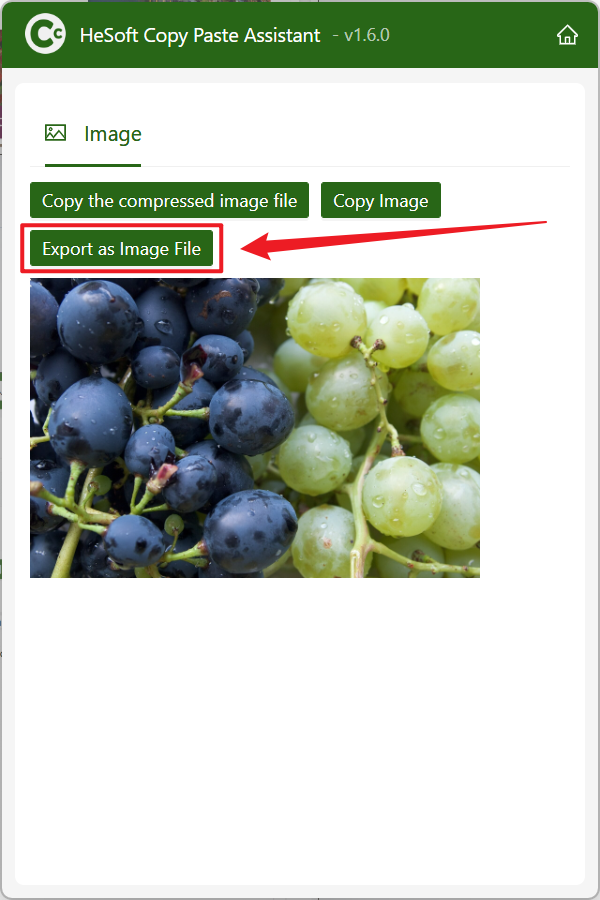
Open 【 HeSoft Copy Paste Assistant 】, and copy the image that needs to be quickly exported as a JPG file on the webpage.

After copying, press Ctrl + C + C to bring up the interface, click 【Export Image File】 to instantly export the image as a JPG file.